



Let’s Start with the Size
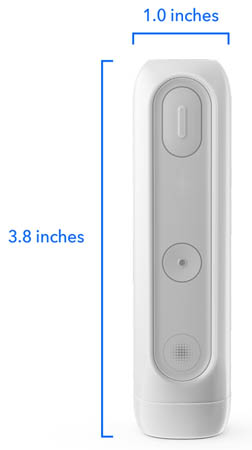
The first thing you notice about the MiniMed Flex is the size. Actually, the first thing you notice is that you almost do not notice it at all.
This thing is tiny. Really tiny.
The MiniMed Flex is much, much smaller than the 780G, and the difference is immediately obvious. It slips into a pocket more easily, takes up less space, and is simply less noticeable on the body.
I did not fully appreciate how much I would like the smaller size until I started wearing it and then stopped thinking about it. For an insulin pump, being forgettable is a compliment. Honestly, the 780G requires a tight belt at times to keep my pants on, so the flex brings the freedom of not unexpectedly flashing people. Which is nice.
Smartphone-Only Control
The other major change is that the Flex is controlled through your smartphone. Initially, I was not sure how I would feel about moving essentially every interaction to the phone. We are used to pulling out the pump to check a glucose, give insulin, or make a quick adjustment.
After a short time, however, using the phone felt very natural. Most of us already conduct half our lives through a smartphone, so adding the pump to that list did not require a major philosophical adjustment.
A New, Streamlined App
The new app helps. It is clean, intuitive, and genuinely user-friendly. The information is easy to find, and the overall experience feels modern. There is not much of a learning curve, which is exactly what you want from something you may use multiple times every day.
A Simple Transition from the 780G
The switch from the 780G was also remarkably easy. The MiniMed Flex uses the same infusion sets (including the 7-day extended wear option), 300-unit cartridges, Instinct or Simplera sensors, and familiar supplies, so I did not have to learn a new insertion process or replace a cabinet full of diabetes equipment. It also uses the exact same algorithm as the 780G, so it felt less like starting over and more like moving into a smaller apartment without having to buy new furniture. I actually just pulled my cartridge out of my 780G and popped it right into the Flex. No loss of insulin or anything.
The New Rechargeable Battery
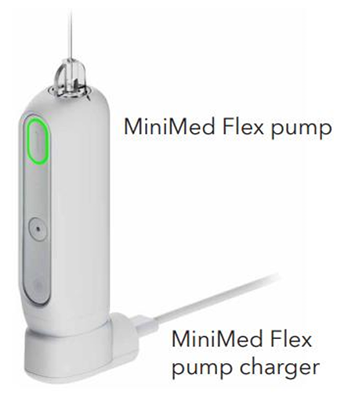
The rechargeable battery is another welcome change. I will not miss searching drawers, backpacks, and glove compartments for a spare battery. Now you plug it in, recharge it, and move on with your life. One less small diabetes chore is still one less diabetes chore. The charge lasts about a week and takes around 30 minutes. So once a week during a shower takes care of it.
The Biggest Adjustment
So far, so good. But no device is perfect, and the biggest adjustment became clear pretty quickly: you can do almost nothing from the pump itself.
Want to see your glucose? You need your phone. Want to check the time? You need your phone. Want to give insulin? You guessed it. You need your phone.
During the day, this is usually manageable because my phone is almost always nearby. In fact, there is a reasonable chance it is already in my hand. But nighttime is a different story.
With the 780G, I could wake up, reach under the covers, pull out the pump, glance at my glucose, give a bolus if needed, and go back to sleep. With the Flex, I have to find my phone, unlock it, and open the app. Then the screen lights up with the intensity of a minor solar event. By that point, I am not just checking my glucose. I am awake, reviewing emails, wondering why I am looking at the weather, and questioning several life choices.
That nighttime experience made me realize that smartphone control is excellent until the smartphone is not the most convenient thing to use. The pump itself is not really a backup interface. It is more like a very important Bluetooth accessory.
So here are my pros and cons:
My Suggestions for the Next Gen
If MiniMed asked what I would change, my wish list would be short. Keep the small size. Keep the app. Keep the easy transition and the rechargeable battery. I would add 2 things:
1. A Quick Bolus Button:
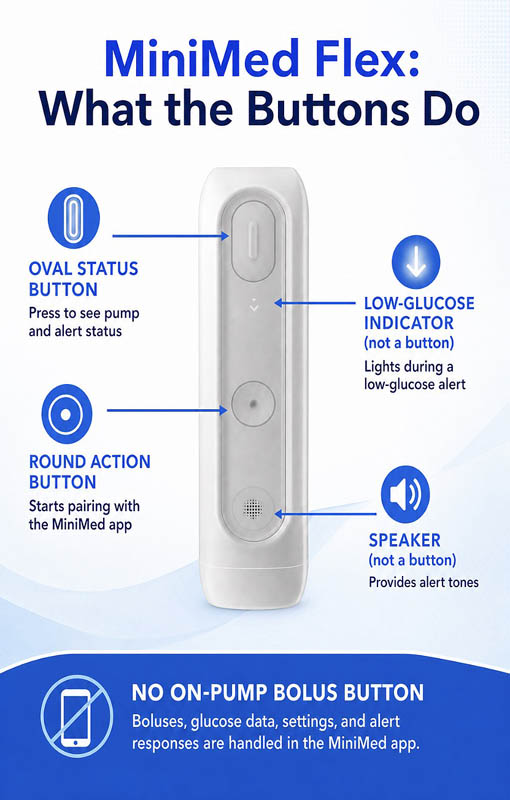
This was a real miss in my opinion. The funny thing is that there actually ARE buttons on the pump, but they do kinda useless things in my opinion. They help to initially pair the pump, and there’s a pump status indicator button.
Aside from the initial startup, I have never used either of these. So, making buttons wasn’t the problem; it was making them useful. You can see my fun little figure below of what the buttons do.
2. A Small Pump Display:
I do not need every setting or menu on the pump. I do not need to play Wordle on it. I just want enough information and control to handle the most common tasks when pulling out a phone is inconvenient, particularly at night.

Our goal is to protect your personal health information. Please keep your questions general and do not post personal medical information here. If you have a specific question, please email events@tcoyd.org.
What CGM does the new MiniMed Flex work with? The Tandem Mobi does have a quick bolus button on the actual pump so I’m sure the MiniMed Flex will have one next time. What about this for nighttime: Glucose Projection Clocks: Devices like the Frixos projection clock display time, glucose numbers, and trend arrows directly onto your bedroom wall or ceiling, allowing you to check your levels upon waking without reaching for a phone.
Cool idea! 👍
The MiniMed Flex works with the Instinct and Simplera Sync sensors. You can learn more here:
https://www.minimed.com/en-us/support/product-support/sensors#tabs-1047dd5fc0-item-b917e64698-tab
Get the t a dem t slim.
Phone-only control is the same complaint I have about the Tandem Mobi. The small size is great but ultimately I need a screen and functional buttons!
A certain number of people would agree with you…it just depends on your preference on how to manage the pump. But the folks at MiniMed have heard this feedback, and they are working on an update.
that’s good to hear because nobody wants a pump during the night that doesn’t have a screen or a bonus button
Totally fair, and I’m with you! Tiny is terrific right up until your phone is dead, missing, or misbehaving. A screen and a couple of functional buttons can feel wonderfully old-fashioned in the best possible way.
Anyone have the new Twiist pump. I was denied because the company doesn’t participate with Medicare and my BCBS wouldn’t pay for it either.
That is unfortunate, but I know the folks at the twiist company are working on Medicare approval, which takes a lot of paperwork.
Uggg, this is the maddening part of pump choice. We can debate features all day, but the ‘best’ pump is the one your insurance will actually let you get. Patients should not have to run an obstacle course just to choose the system that fits them.
Thank you Jeremy for those Real world observations. I’m a devoted 780G user, and am on the fence as to whether to change to Flex or stay with 780G. I have many of the concerns you mentioned, although I never really thought about the nighttime realities.
I would like to mention something that I do like about the Flex: It is much more waterproof than the 780G. Although the 780G is supposed to be waterproof, I did have one fail in a pool due to an unnoticed crack in the case, so I’ll never take a 780G in the water again. But the Flex is a tighter design and hasn’t had any reports of cracks (because there’s no weakness around a battery compartment). So if you like the water, the Flex has a huge upside.
Thank you so much for your comment and sharing your experience!
This is a great point, and thank you for adding it. Waterproofing may not matter much until the day it matters a lot, and a sealed design without a battery-door weak point is a real advantage for swimmers and water people. This is exactly why there is no universally ‘best’ pump: nighttime usability may push someone one way, while water resistance may push someone another.
Our son has 26 years of Type-1 diabetes insulin pump use … and has scar tissue due to all those years. With his prior 780G he usually did not have insulin delivery issues … and he was using its standard bolus speed mode. However, since switching to the Flex pump he has had serious issues with daily repeated low’s and other inconsistent insulin delivery issues. In researching, it appears the Flex pump has only one bolus delivery speed with is about 6.5 times faster than the 780G standard mode. Per research, apparently with scar tissue there can be a variety of reasons this can result in inconsistent insulin delivery, including lows that certainly appear to be from insulin entering the blood stream later than “normal” — likely because it was temporarily being stored in unplanned “reservoirs” in the tissue, before eventually being released — apparently a known scar tissue phenomena, according to the research I have found.
Sometimes insulin delivery performs fine. But unfortunately, the inconsistent delivery is happening every day, with the biggest problems throughout the night.
That sounds incredibly frustrating, and repeated overnight lows are something I would take very seriously. Scarred or repeatedly used infusion sites can make insulin absorption less predictable, but I would be cautious about assuming the faster bolus speed or temporary insulin ‘reservoirs’ are the cause without a formal evaluation. I would have his diabetes team promptly review the pump and CGM data, settings, infusion sites, and infusion-set type. Thank you for raising this. Real-world experiences like his are exactly what clinicians and manufacturers need to hear.
If your settings are dialed in you should expect to be 100% TIR overnight, I have not gotten a single alert over night in 92 days with Flex. Also in the future (probably before they do anything with the buttons) the new algorithm for many should eliminate the need for the phone except to change consumables. What I don’t like about Flex is its insulin delivery speed I find it too fast for large boluses.
First of all, 92 nights without an alert is pretty darn impressive. I’m jealous of both the glucose control AND the sleep!
I’d hesitate to say everyone should “expect” 100% TIR overnight. It’s a great goal, but diabetes occasionally refuses to read the instruction manual. And your point about bolus speed is a good one. For larger boluses, delivery speed can absolutely be something people notice and have a preference about.
How do you bolus for foods (meals) with the Flex? Is this done on your phone also?
If phone has to be charged in the day, is the Flex still working?
Phone is the only interface. Phone charging has nothing to do with Flex operation. Phone phone runs SnartGuard algorithm internally, phone used to view your BG, bolusing and set change in between those activities you don’t need to touch phone or pump, pump will alert when if need to look at your phone. Phone can be on charged pump and phone communication is via Bluetooth.
Yes, you bolus from your phone, and the pump will still work if your phone is charging. Here are two very helpful FAQ pages that go into more detail:
https://www.minimed.com/en-us/loop-blog/minimed-flex-phone-controlled-insulin-pump-easier-diabetes-management
https://www.minimed.com/en-us/products/minimed-flex-system
Hope that helps!
I just want to go back to blousing on my phone. My 780g warranty is up at the end of the year so I’ll get the Flex then. Don’t tell my Endo that I bolus for more of the food I eat when I can easily bolus with my phone!! 😆
Haha! Your secret is safe with us!
Maybe I am too old to change, nearly 60 years with T1D and now 3<4 of a century old. I find myself searching for my phone at least once a day. I have NEVER had to search for my pump. I notice that if I am listening to an audio on my phone and slip it in my pocket, often the audio settings change. That never happens with my pump. Never. When the pump battery needs changing, that is a quick fix. I carry a battery in my glucose monitor /wallet bag. Maybe a minute of my time. There have been a number of times I've wanted to change the algorythm to suit my needs, yet I can't. The Flex has the same algorythm. Oh, I refuse to use any Apple product, so there's that, too. I haven't heard any information about the CGM. The 780G unit is notoriously incorrect, especially when I am approaching lows.That is what I'd like to change. The Flex has nothing for me. I don't want it.
I don’t think you’re too old to change. After almost 60 years with T1D, you’ve earned the right to know what works for you!
Phone control is a huge plus for some people, but not everyone. I lose my phone far more often than I lose something physically attached to me! And if what you really want is more algorithm flexibility or a different CGM experience, changing the pump itself may not solve that problem.
The best pump is the one that makes diabetes take up LESS space in your life. If your current setup does that, I’m not going to pry it out of your hands.
I thought the algorithms automatically give correction bolus every 5 minutes, isn’t it? If in that case, the button to check glucose would not be necessary, in my humble opinion.
Different strokes for different folks! 🙂
I appreciated your article. I’m on insulin about 55 years and a retired internist. Based on your article I will not be switching to the Flex. The “ under the covers “ observations would be a big concern for me.
Plus I’m a big tennis player. I put my 780G on a higher temporary target and keep the pump in my pocket. This allows me to keep an eye on my number anytime. Does anybody know why Sasha Zverev isn’t a pumper ?
I completely get it. The “under the covers test” sounds silly until it’s 2 AM and you’re actually under the covers! Little usability issues become big ones when you live with a device 24/7.
Tennis is another great example. If having the pump in your pocket lets you quickly see what’s happening and your current system works well during exercise, Flex may simply not offer you much.
I have the tandem Mobi but I really miss my OmniPod – loved being able to go in shower and pool with it. Do enjoy the G7 that communicates with my watch without phone!
Yes, that is such a great feature!
Iam on the fence about any pump that is totally tied to a phone. My fear is what happens if you drop your phone in water,loose it ,you forget to take it with you. I only use my phone when I have to make a call so does that leave me out of the loop with the new and smaller pumps. This sounds stupid but to me cell phones are a waste of my time and money. So in the end where can I go with this mindset. -Al
I totally understand where you’re coming from! Jeremy felt that way a little bit, but he quickly got used to the idea since he enjoyed the positives of the Flex more than the fact that he has to use his phone for adjustments. However, if that’s not for you, I would suggest getting a pump that has controls on the pump itself. Thankfully we have options!
Thank you for your report. I’m well into my 70’s, 46 years T1D and on MiniMed pump systems for 31 of those. I transitioned to the MiniMed Flex 1 month ago today and there’s no going back. Unlike you Doc I don’t miss the screen interface on the pump. I’m in a healthy relationship with my phone – it’s always within reach. I greatly appreciate the 780G algorithm that stayed with the Flex. TIR is 90% or better with 0% lows so I’m never awakened at night to bolus or treat.
That’s awesome!👏
I also just went from the 780G to Mijimed Flex and couldn’t believe how much I really do like it. I can say sometimes it is a pain not to ha e a bolis button but as far as nighttime I wear my apple watch and ha e the minimed app on the screen so I can tap it and see where my numbers are.
That’s awesome!
My daughter is 10 and we have been using 780g for the past 2 1/2 years. We’ve really liked it and such an improvement over our experience with omnipod. I was initially hesitant to consider the flex because she’s a kid and has broken 2 phones in 3 years and sometimes at really inconvenient moments. Now we really can’t consider it for a bit because we tried instinct for 6 months and it absolutely wrecked our control. Massive highs and lows. I thought we were being attacked by impending puberty but we ran out of instincts early a few weeks ago and put a G4 back on and her TIR immediately jumped back up to our previous numbers: 75-85% vs 60-65 on instinct with zero other settings changes. She had been asking about going back to G4 before this and now she’s nervous to try simplera. This leaves us unable to consider any upgrades right now.
Wow, thank you for sharing. I’ve honestly never heard of major swings in control due to two different CGM devices. In any case, you have to use what’s best for her.
Thanks for the Flex summary, greatly appreciated, also the comments, people. I’m a long-term 780G user, with decent control. Not on Flex yet, but size and form factor looks great. Almost 100% reliance on the phone is a bit disappointing. I agree with you about the night-time issues, having to interact with the phone to check the status, bolus perhaps, or respond to an alarm is no good. As I’m almost 60, likely having to fumble for, and put on my glasses also, hmmm. At least they could have made it possible to silence an alarm on the pump, is this really correct? If so, as an avid windsurfer/windfoiler, having to use the phone while out on the water, simply to silence an alarm, is no good. A useful (non-Apple) smartwatch solution would be great
You are correct – you do need your phone to silence an alarm. Another thing to note is that you have to use the Flex charger, which is a dock that only exists for the Flex. So if you forgot it while traveling, you can’t just run out to Target to buy a charging cable. Perhaps something to be considered in the next gen.